Case Study
Redesigning Contract Lifecycle Management
How design thinking and AI-powered prototyping transformed a complex enterprise workflow into an intuitive experience.
Role
Lead Product Designer
Timeline
16 Weeks
Team
Cross-functional, 8 members
Overview
Contracts are the lifeblood of enterprise relationships. The process of managing them shouldn't be.
The existing Contract Lifecycle Management (CLM) platform served thousands of enterprise users daily, but was built incrementally over years without a cohesive design vision. Users reported frustration with fragmented workflows, unclear next steps, and a steep learning curve that slowed adoption.
Our team was tasked with reimagining the entire experience using a design thinking approach. We leveraged AI-powered prototyping tools to rapidly explore solutions, tested with real customers at every stage, and iterated our way to a cohesive platform that reduced contract cycle times by 40%.
40%
Reduction in contract cycle time
62%
Increase in user satisfaction (SUS)
35%
Fewer support tickets post-launch
48
User interviews conducted
Methodology
A design thinking approach, accelerated by AI
Phase 01
Empathize
Understanding the pain
We conducted 48 user interviews across five distinct personas to deeply understand how contracts flow through the enterprise. Shadowing sessions revealed that users were spending 60% of their time navigating between screens rather than doing meaningful work.
Phase 02
Define
Framing the problem
We synthesized research into a clear problem statement: "Enterprise users need a unified contract workspace that surfaces the right actions at the right time, so they can move contracts forward without switching contexts." This became our north star throughout the project.
Phase 03
Ideate
AI-powered exploration
Using AI-assisted design tools, we generated over 120 concept variations in a fraction of the time traditional methods would allow. We used AI to rapidly explore layout patterns, information hierarchies, and interaction models. Design sprints with the full team distilled these into three promising directions.
Phase 04
Prototype
From concepts to clicks
We built interactive prototypes that simulated the full contract lifecycle. Using AI to accelerate UI generation, we created high-fidelity prototypes in days rather than weeks. Each prototype embodied a different approach to the "Next Steps" paradigm that would guide users through the contract process.
Phase 05
Test & Deliver
Validated through iteration
We ran three rounds of usability testing with 36 participants across all persona groups. Each round informed design iterations that progressively improved task success rates from 54% to 92%. The final design was handed off with a comprehensive design system and detailed specifications.
Empathize
Five personas, one connected journey
Through our research, we identified five primary personas that interact with the CLM process at different stages. Each has distinct needs, pain points, and goals that shaped our design decisions.
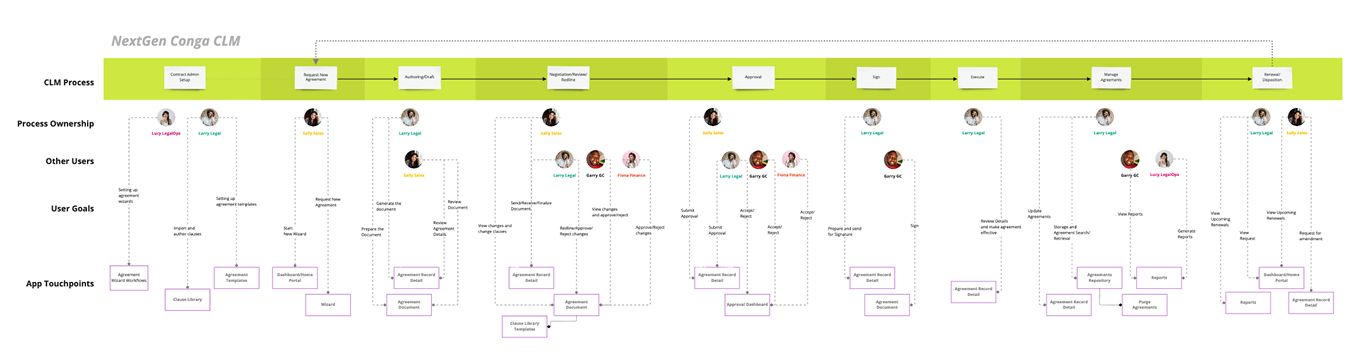
CLM Process Map — Mapping process ownership, user goals, and app touchpoints across the full contract lifecycle
Larry Legal
Legal Counsel
Pain Point
“Navigating across 14+ screens to complete a single contract review. No clear sense of what action comes next.”
Goal
A unified workspace where I can author, review, and manage contracts without losing context.
Process Touchpoints
Sally Sales
Sales Representative
Pain Point
“I just need to get a contract out the door. I shouldn’t have to understand legal terminology to request an NDA.”
Goal
A simple way to request, track, and get contracts signed without becoming a legal expert.
Process Touchpoints
Fiona Finance
Finance Manager
Pain Point
“I only see contracts when they need financial approval. I have no context about the history or urgency.”
Goal
Clear visibility into contract value, obligations, and financial impact at the approval stage.
Process Touchpoints
Barry BC
Business Compliance
Pain Point
“I need to review compliance across hundreds of contracts. There’s no way to quickly assess risk or flag deviations.”
Goal
Dashboards and insights that surface compliance risks before they become problems.
Process Touchpoints
Lucy LegalOps
Legal Operations
Pain Point
“I can’t get a clear picture of our contract portfolio performance. Reports are manual and always outdated.”
Goal
Real-time reporting and operational oversight across the entire contract lifecycle.
Process Touchpoints
Outcomes
Three iterations, each informed by real user feedback
Each design iteration was tested with users from all five persona groups. Here's how the product evolved from initial concept to the final shipped experience.
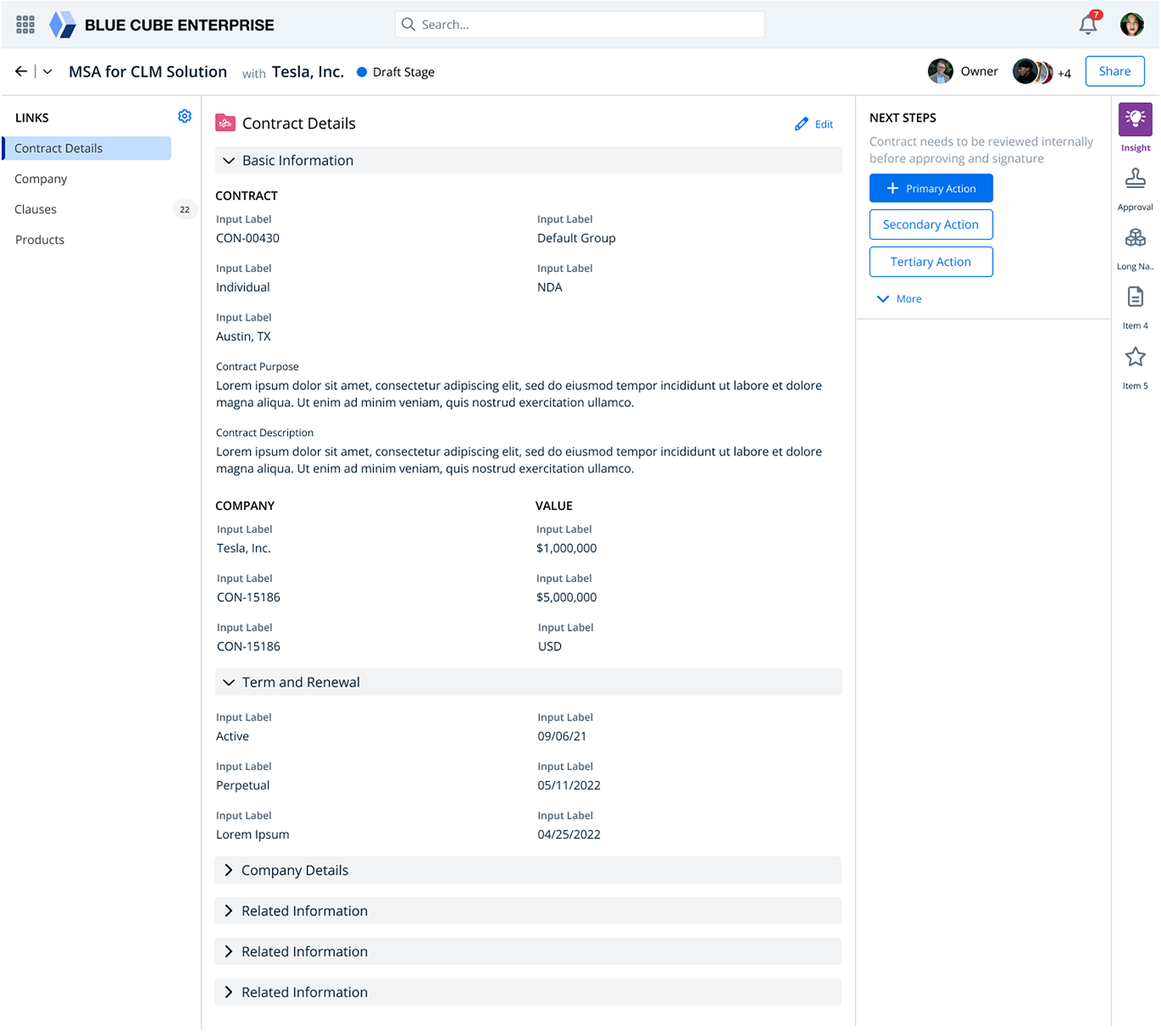
The Unified Contract Workspace
Our first major prototype introduced the three-panel layout: contextual navigation on the left, contract details in the center, and intelligent 'Next Steps' actions on the right. This layout was inspired by user feedback that they needed to see contract context and available actions simultaneously without switching screens.
Key Design Decisions
Left panel links provide quick access to contract sections, company info, clauses, and products
Center panel shows rich contract details with inline editing capability
Right panel surfaces contextual 'Next Steps' with primary, secondary, and tertiary actions
Insight panel provides AI-driven recommendations at each stage
Validate
Testing with real users at every turn
We ran three structured usability testing rounds with 36 total participants spanning all five personas. Each round targeted specific aspects of the design and directly informed the next iteration.
Task Success Rate Progression
Information Architecture & Navigation
Finding
Users couldn’t find clause management or related contracts. The left navigation was too flat and lacked hierarchy.
What We Changed
Restructured navigation into grouped sections with counts. Added breadcrumbs and contextual links between related records.
Next Steps & Workflow Actions
Finding
Users loved the "Next Steps" panel but were confused by too many actions displayed simultaneously. Priority was unclear.
What We Changed
Implemented progressive disclosure with primary/secondary/tertiary action hierarchy. Added contextual guidance text above actions.
Review & Send Flow
Finding
The email preview dramatically increased confidence. Users wanted more control over document-level permissions.
What We Changed
Added per-reviewer access levels (Full Access, Comments Only). Introduced expiration dates and automated reminders.
Reflection
What this project taught me
AI accelerates exploration, not decision-making
AI-generated prototypes gave us breadth we could never have achieved manually, but every final design decision was grounded in user research and testing. AI is a multiplier for creative exploration, not a replacement for design judgment.
Progressive disclosure is the key to enterprise UX
Enterprise users deal with enormous complexity, but they don’t need all of it at once. The "Next Steps" panel became the linchpin of the design because it surfaces only what’s relevant at the current stage.
Test with all personas, not just the loudest
Early testing skewed toward legal users (Larry Legal). When we intentionally recruited Sally Sales and Fiona Finance, we discovered entirely different pain points that reshaped our navigation and action hierarchy.
Design systems enable speed at scale
Building a shared component library early meant our three iterations could ship faster and maintain consistency. The design system became the bridge between design intent and engineering execution.